Is uBlock Origin No Longer Supported? Chrome, Edge and Android Options
Learn why uBlock Origin stopped working in Chrome, what is changing in Edge, how uBlock Origin Lite differs, and how to keep blocking ads on Android.

Kayla
Quetta Networks


Classic uBlock Origin is no longer supported in Google Chrome because it relies on Manifest V2, the older extension platform Chrome has phased out. Microsoft Edge has also begun its Manifest V2 transition. uBlock Origin still works in supported browsers such as Firefox and in Quetta Browser on Android, while uBlock Origin Lite remains available for Manifest V3 browsers.
The browser matters because uBlock Origin itself has not simply disappeared. What changed is the extension system used by Chrome and other Chromium-based browsers. At the same time, the maintainers of uBlock Origin's default filters have stopped maintaining Facebook-specific ad filters, creating a second—and separate—reason some users are seeing ads again.
This guide explains what changed, where the full version still works, how uBlock Origin Lite compares, and what Android users can do next.
uBlock Origin support at a glance
Browser or option | Classic uBlock Origin | uBlock Origin Lite | Built-in ad blocking | Current position |
|---|---|---|---|---|
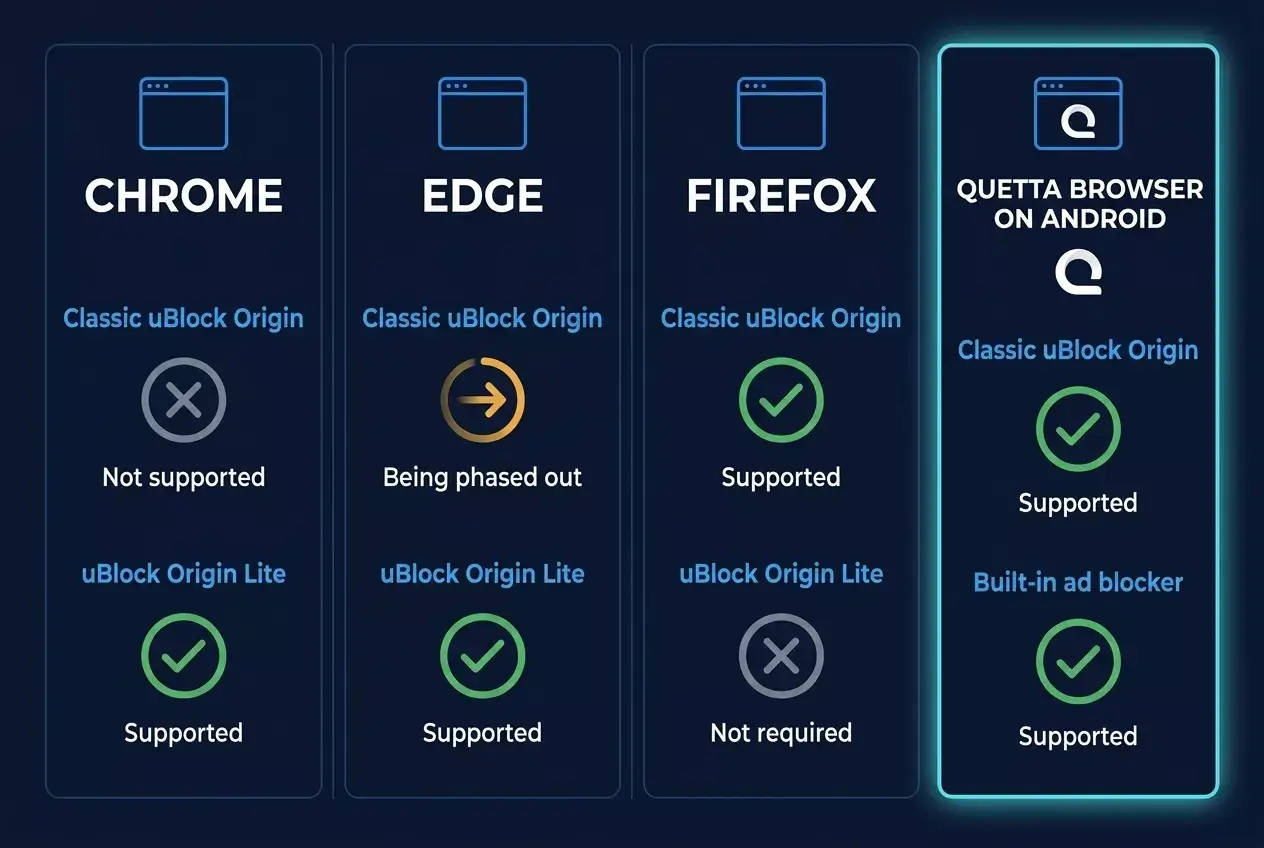
Google Chrome desktop | No | Yes | No | Chrome has phased out Manifest V2 support |
Microsoft Edge desktop | Being phased out | Yes | Limited browser protections | Edge began warning users in August 2026 and is gradually disabling Manifest V2 |
Firefox desktop | Yes | Not required for full uBO | Enhanced Tracking Protection | Full uBlock Origin remains available through Mozilla Add-ons |
Chrome for Android | No extension support | No local desktop-extension support | No | Chrome for Android does not run desktop Chrome extensions |
Quetta Browser for Android | Yes | Supported extensions may also be installed | Yes | Supports extensions and includes an independently maintained blocker |
Quetta Browser for iOS | No desktop-style extension support | No | Yes | Uses Quetta's built-in ad and tracker blocking |
Extension behavior can change with browser releases, so check the date above when comparing options. For a broader platform comparison, see our guide to the best Android browsers with extension support.
Why is uBlock Origin no longer supported in Chrome?
Classic uBlock Origin stopped working in Chrome because it is a Manifest V2 extension. Google replaced Manifest V2 with Manifest V3 and progressively disabled older extensions. This is a browser-platform change—not a decision by the uBlock Origin developer to discontinue the project everywhere.
Manifest files define what an extension can access and which browser APIs it can use. Traditional content blockers such as uBlock Origin relied on Manifest V2 capabilities to inspect and modify network requests dynamically. Manifest V3 changes that model, including greater reliance on the declarativeNetRequest API.
Google began the Manifest V2 phase-out in 2024, first showing warnings and then disabling affected extensions. As a result, the classic Chrome edition of uBlock Origin could not remain a normally supported extension in current Chrome releases.
This does not mean Chrome blocks every ad blocker. Manifest V3-compatible blockers can still operate, but they must work within a different set of APIs and restrictions.
Does uBlock Origin still work on Microsoft Edge?
Classic uBlock Origin may still work temporarily for some Edge users, but Microsoft is phasing out Manifest V2. Microsoft announced that warnings would begin in August 2026, followed by the gradual disabling of Manifest V2 extensions over the following months. Consumer migration is scheduled to complete by the end of 2026, with a later transition for managed enterprise environments.
Because the rollout is gradual, two Edge users can see different behavior at the same time. One installation may still run uBlock Origin while another displays a warning or disables it by default. Browser channel, version, device management policies, and rollout timing can all affect the result.
Microsoft explains the underlying platform differences in its Manifest V3 migration documentation. Its August 2026 phase-out announcement is available on the Microsoft Edge Blog.
If uBlock Origin is essential to your setup, do not assume that manually re-enabling it in Edge is a permanent solution. Choose a browser that continues to support the full extension, or evaluate a maintained Manifest V3 or built-in alternative.
Is uBlock Origin being discontinued?
No. uBlock Origin is not being discontinued across all browsers. The full extension remains maintained for compatible platforms, including Firefox. The loss of Chrome and future Edge support applies to the classic Manifest V2 build on those browsers.
You can verify the current Firefox release through the official uBlock Origin listing on Mozilla Add-ons. Android users who prefer the full extension can also run it in a compatible extension browser such as Quetta.
The distinction is important:
The uBlock Origin project still exists.
Classic uBlock Origin no longer works in current Chrome.
Edge is phasing out the same Manifest V2 extension.
Firefox and compatible Android browsers can still run the full version.
uBlock Origin Lite is a separate Manifest V3 product, not an automatic upgrade.
uBlock Origin vs uBlock Origin Lite: what is the difference?
uBlock Origin Lite is an efficient Manifest V3 content blocker, but it is not identical to classic uBlock Origin. Its developer deliberately treats it as a separate, lighter product rather than an automatic replacement. Whether users notice a difference depends on the websites they visit and how extensively they used uBlock Origin's advanced controls.
Capability | uBlock Origin | uBlock Origin Lite |
|---|---|---|
Extension platform | Manifest V2 | Manifest V3 |
Works in current Chrome | No | Yes |
Works in Firefox | Yes | Full uBO is normally the better fit |
Dynamic filtering controls | More extensive | More limited by design |
Default generic cosmetic filtering | Yes | Requires Complete mode |
Anti-adblock and difficult-site handling | More capable overall | Some filters cannot be converted to declarative rules |
Best suited to | Users wanting maximum control | Install-and-forget users on MV3 browsers |
According to the official uBlock Origin Lite FAQ, Lite does not automatically replace the original extension. The developer notes that it may be less effective on sites using anti-content-blocker techniques because some filters cannot be expressed as Manifest V3 declarative rules.
That does not make Lite ineffective. Its fully declarative design can filter reliably when the browser starts and can be efficient for users who want a lower-maintenance blocker. It is simply a different trade-off.
Where can you still use the full uBlock Origin?
Firefox on desktop
Firefox continues to support the full uBlock Origin extension. For desktop users who want uBlock Origin's advanced filtering and controls, Firefox is the most direct mainstream option. Install it only from the verified Mozilla Add-ons listing and confirm that the publisher is Raymond Hill.
Quetta Browser on Android
Quetta Browser supports uBlock Origin on Android and also includes a native ad and tracker blocker. This gives Android users two routes: keep using the full extension when they need its advanced controls, or use Quetta's built-in blocker for a simpler setup managed with the browser.
Quetta provides access to extensions from the Chrome Web Store and Microsoft Edge Add-ons. Because extension-store availability can change independently of browser compatibility, use the verified publisher listing available at the time of installation. You can follow our step-by-step guide to install and manage browser extensions on Android.
Other browsers
Do not assume that every Chromium-based browser supports classic uBlock Origin merely because it once supported Manifest V2. Browser vendors can choose different transition schedules, but Chromium platform changes and extension-store availability still affect long-term support. Verify the latest browser release and the exact extension before moving your setup.
How to use uBlock Origin in Quetta Browser on Android
To use the full uBlock Origin extension on Android:
Download Quetta Browser and update it to the latest stable version.
Open Quetta's extension area from the browser menu.
Open a supported extension store.
Find the official uBlock Origin listing published by Raymond Hill—not an imitation with a similar name.
Review the requested permissions and install the extension.
Confirm that it is enabled in Quetta's extension manager.
Visit a normal webpage and test the extension's main controls.
Quetta already has a built-in blocker, so most users do not need to run two blockers at the same time. Overlapping blockers can make broken pages and filter problems harder to diagnose. Start with Quetta's built-in protection; add uBlock Origin only when you need its specific advanced features.
For a detailed decision framework, compare a built-in ad blocker vs an extension on Android.
Why did uBlock Origin stop maintaining Facebook ad filters?
The maintainers of uBlock Origin's default filter lists have stopped maintaining Facebook-specific ad filters because Facebook repeatedly changes its pages to counter public filtering rules. This concerns the maintenance of default Facebook filters; it does not mean the uBlock Origin extension itself has shut down or that every custom filter immediately stopped working.
In an August 2026 statement from the uBlock Origin community, maintainers explained that Facebook was repeatedly observing and countering open-source fixes. They also emphasized that a very small volunteer team could not continue spending disproportionate time on one website.
Facebook ads are unusually difficult to filter reliably because sponsored posts can be made to resemble ordinary feed content. Page structures, class names and labels can change, while fixes published in an open filter list can be studied and bypassed quickly.
Users should therefore understand three separate facts:
uBlock Origin still exists and remains supported on compatible browsers.
Its default filter maintainers are no longer committing resources to Facebook-specific ad-filter fixes.
Custom filters or third-party lists may still work temporarily, but their reliability is not guaranteed by the uBlock Origin maintainers.
Does Quetta Browser still block Facebook ads?
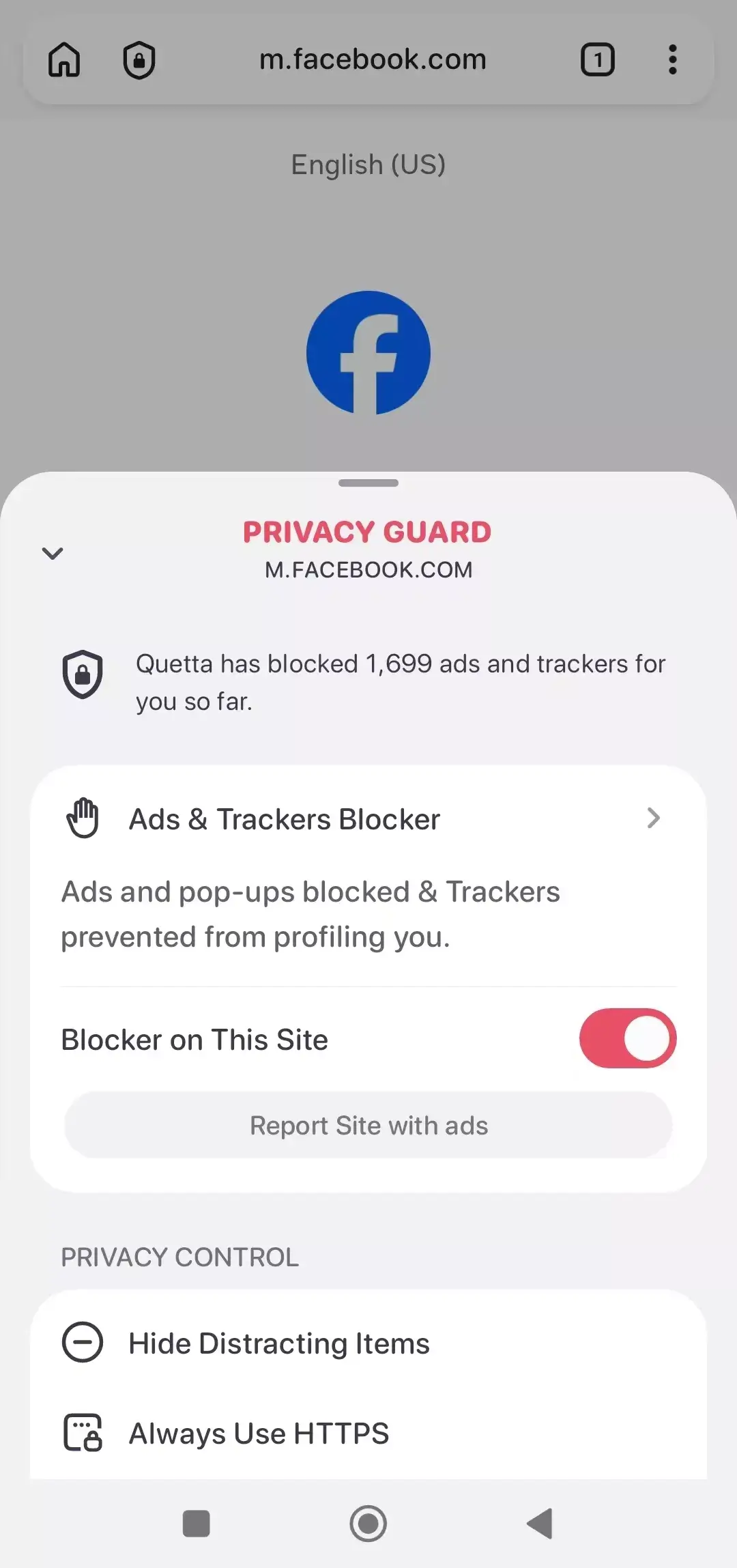
Yes. Quetta has confirmed that its built-in ad blocker will continue supporting Facebook ad blocking. This protection is maintained independently from uBlock Origin's default Facebook filters, so the uBlock Origin maintainers' decision does not end Quetta's work on Facebook ads.
No ad blocker can honestly promise that every Facebook ad will be blocked forever. Facebook can change how sponsored content is delivered, and a rule that works today may require an update later. Quetta will continue maintaining its Facebook ad-blocking support and updating the blocker as Facebook changes its implementation.
To keep Quetta's filtering current:
Update Quetta Browser to the latest version.
Open Settings → Privacy Guard → Ads & Trackers Blocker.
Open Content Filter.
Update the available filter lists.
Reload Facebook and test the feed again.
Advanced users can also create custom filters using syntax that is broadly compatible with uBlock Origin rules. See the complete guide to managing adblock filters in Quetta.
If an ad appears, note where it appears—Feed, Reels, video, Marketplace or sidebar—and report the page and Quetta version. A precise report is more useful than saying only that “Facebook ads are back.”
Which uBlock Origin alternative should you choose?
The right choice depends on whether you want the full extension, want to remain in a Manifest V3 desktop browser, or primarily need ad blocking on Android.
Your priority | Recommended starting point |
|---|---|
Keep the full uBlock Origin on desktop | Firefox with the official uBlock Origin add-on |
Stay in Chrome or Edge | Evaluate uBlock Origin Lite and its limitations |
Use full uBlock Origin on Android | Quetta Browser for Android |
Block ads without managing an extension | Quetta's built-in ad and tracker blocker |
Block Facebook ads on mobile web | Quetta's independently maintained built-in blocker |
Compare browser, DNS, VPN and extension methods | Read our Android ad blocker comparison |
For most Android users, a built-in blocker is the simplest starting point because it avoids a separate installation and is maintained with the browser. Power users can still add uBlock Origin in Quetta when they need granular controls or particular filter features.
The bottom line
Classic uBlock Origin is no longer supported in Chrome and is being phased out in Edge, but the extension itself is not dead. Firefox still supports the full desktop extension, Quetta supports it on Android, and uBlock Origin Lite provides a Manifest V3 option for Chrome and Edge users who accept its different capabilities.
The Facebook change is separate from Manifest V2. uBlock Origin's default filter maintainers have stopped maintaining Facebook-specific rules, while Quetta has confirmed that its built-in blocker will continue supporting Facebook ad blocking independently.
If you want an Android browser that combines extension access with built-in ad and tracker blocking, download Quetta Browser.
Frequently asked questions
Is uBlock Origin no longer supported?
Classic uBlock Origin is no longer supported in Google Chrome because Chrome phased out Manifest V2. Edge is also phasing it out. The full extension remains available in compatible browsers such as Firefox and Quetta Browser on Android.
Why was uBlock Origin removed from Chrome?
The classic extension uses Manifest V2. Chrome moved its extension platform to Manifest V3 and disabled older Manifest V2 extensions. uBlock Origin Lite is a separate Manifest V3-compatible blocker.
Is uBlock Origin Lite the same as uBlock Origin?
No. uBlock Origin Lite uses Manifest V3 and is designed around declarative filtering. It is not an automatic replacement for full uBlock Origin and has different capabilities, permissions and filtering trade-offs.
Does uBlock Origin still work on Firefox?
Yes. The full uBlock Origin remains available through Mozilla Add-ons. Install it from the verified listing published by Raymond Hill.
Can I use uBlock Origin on Android?
Yes, but not in Chrome for Android. You need an Android browser with extension support, such as Quetta Browser. Quetta can run uBlock Origin and also includes its own ad and tracker blocker.
Does uBlock Origin still block Facebook ads?
The uBlock Origin default filter maintainers have stopped maintaining Facebook-specific ad filters. Some custom rules or third-party lists may still work, but the project's default filters no longer promise ongoing Facebook fixes.
Will Quetta continue blocking Facebook ads?
Yes. Quetta has confirmed that its built-in blocker will continue supporting Facebook ad blocking independently of uBlock Origin's default filter lists. Because Facebook changes frequently, users should keep Quetta and its filter lists updated.