Browser Downloader vs Online Converter vs YouTube Premium
Compare browser-based video downloaders, online converters, and YouTube Premium for offline viewing. See how they differ in workflow, storage, privacy, formats, and device access.

Kayla
Quetta Networks


A browser-based downloader detects compatible media while you browse, an online converter asks you to submit a video link to a separate service, and YouTube Premium keeps supported offline downloads inside YouTube. The best option depends on whether you need an independent local file, official in-app offline access, or a specific format.
These three methods may all be described as “downloading,” but they produce different experiences. The distinction matters for privacy, storage, playback, device access, and what happens when you go offline.
Quetta supports most publicly accessible YouTube videos in compatible product versions. Use downloading in accordance with YouTube's terms, applicable rights, and local law. Review the current YouTube Terms of Service for the authoritative wording.
Quick comparison
Question | Browser-based downloader | Online converter | YouTube Premium |
|---|---|---|---|
Requires copying a link? | Usually no | Usually yes | No |
Runs in the current browsing workflow? | Yes | No, opens another site | Yes, inside YouTube |
Produces an independent local file? | When a compatible file is available | Often, depending on the service | No; offline items stay inside YouTube |
Format choice | Depends on detected source media | Depends on conversion service | Controlled by YouTube |
Offline access | Local playback when the file is compatible | Local playback when a file is produced | Requires the same signed-in account and periodic reconnection |
Main trust question | Extension/app permissions and publisher | Who receives the URL and processes the file | Subscription, account, and YouTube availability |
Best fit | Authorized local copy and browser-integrated workflow | A conversion task from a service you trust | Official offline viewing inside YouTube |
YouTube states that Premium downloads can be played offline through the signed-in account, may require reconnection, and can be removed if the video is no longer available. Higher-quality downloads also use more data and storage. See YouTube’s official Premium offline guide.
What is a browser-based video downloader?
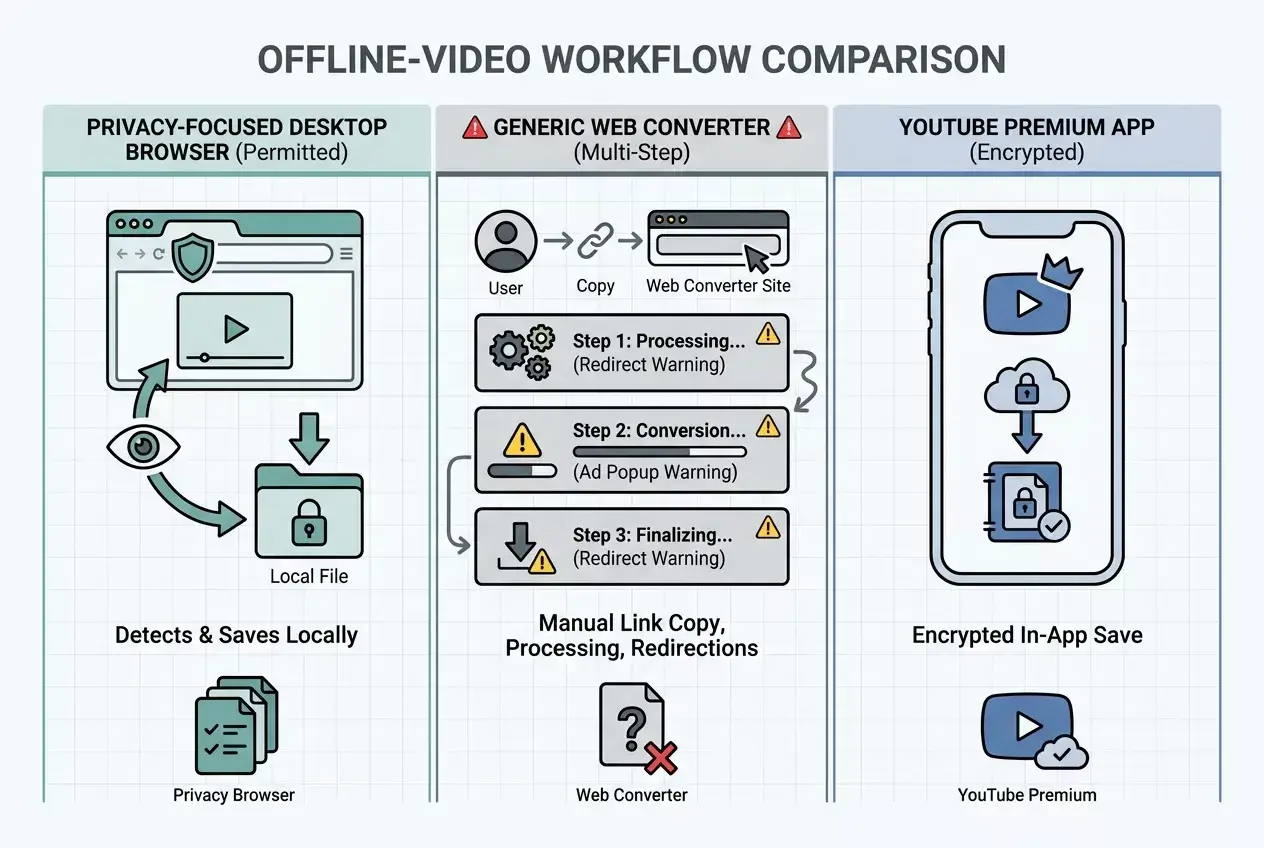
A browser-based downloader works where the video is already open. It detects compatible media exposed to the webpage and displays the formats or resolutions available from that source. This eliminates the copy-paste step used by converter sites.
Quetta offers two browser-based approaches:
A built-in downloader in compatible versions of Quetta Browser.
The Quetta Video Downloader extension for desktop browsers.
For supported YouTube downloads, Quetta’s Firefox and Microsoft Edge extensions can detect compatible video and audio options. The Chrome extension does not currently support YouTube.
The main advantage is continuity: browse, detect, download, and find the file without submitting the page URL to a separate conversion website. The tradeoff is that the source must expose compatible media. A browser downloader cannot guarantee every video, format, or quality.
What happens when you use an online converter?
An online converter usually follows this sequence:
Copy a video-page URL.
Open a separate conversion website.
Submit the URL.
Wait while the service analyzes or processes it.
Choose a proposed output.
Download the resulting file.
This approach may be useful when genuine format conversion is required, but it introduces another service into the workflow. Before using one, determine who operates it, what data it collects, whether it stores submitted URLs or files, which permissions it requests, and whether its download buttons are clearly distinguished from advertising.
Do not assume that a site is trustworthy because it ranks for a popular keyword. Search position is not a substitute for a transparent company identity, privacy policy, secure connection, or a clear explanation of processing.
What YouTube Premium downloads actually provide
YouTube Premium offers the official offline route for eligible videos and regions. On supported computers, users can download through browsers listed by YouTube, then view the items through YouTube’s Downloads section while signed in.
The important distinction is storage. YouTube’s help documentation explains that mobile offline videos are stored in an encrypted form and viewed inside the YouTube app rather than appearing as ordinary gallery files. YouTube also says its app does not provide separate audio, music, or MP3 downloads. See the YouTube offline FAQ.
Premium is therefore a good fit when your goal is official offline playback rather than obtaining a reusable local media file.
Choose by outcome, not by keyword
Choose YouTube Premium when:
You want the official offline experience.
Watching inside YouTube is acceptable.
You do not need an independent file.
The video and feature are available in your region.
Choose a browser-based downloader when:
You need a compatible local file and your intended use is permitted.
You need a compatible local file.
You want to avoid submitting the video URL to a separate converter.
Your browser or platform supports the required source.
See all supported ways to download YouTube videos with Quetta, or go directly to the appropriate instructions for Windows, Mac, or Android.
Consider an online converter only when:
You genuinely need conversion rather than source detection.
You can identify the operator and understand its data handling.
The page does not use misleading buttons, forced redirects, or unrelated installation prompts.
The intended use is permitted.
Privacy and permissions deserve separate checks
Browser tools and converter websites expose different trust surfaces.
For an extension, review its publisher, official store listing, requested permissions, site access, update source, and privacy disclosure. Mozilla explains that Firefox permissions tell users what an extension can access or modify, including webpage data and download history. Read Mozilla’s extension permission guide.
For an online converter, evaluate the website itself: ownership, privacy policy, processing location, retention, redirects, advertising, and whether it tries to install additional software.
Final recommendation
There is no universally best download method. YouTube Premium is the clearest choice for official in-platform offline playback. A browser-integrated downloader is more suitable when a user needs an available local file without a copy-paste converter workflow. An online converter adds a third-party processing step and therefore requires more scrutiny.
The correct comparison is not “free versus paid.” It is in-app offline access versus a local compatible file versus external conversion.
Frequently asked questions
Is YouTube Premium the same as downloading a normal video file?
No. Premium downloads are managed inside YouTube and require the appropriate account and periodic availability checks. They are not ordinary gallery or desktop files.
Does a browser downloader convert every video to MP4?
No. A browser downloader can display compatible media supplied by the source. Format conversion is a separate capability and should not be claimed unless it actually occurs.
Is an online converter always unsafe?
No. The category includes different operators and implementations. Evaluate each service’s ownership, permissions, privacy disclosures, processing, advertising, and download behavior rather than making a blanket assumption.
Can Quetta download YouTube videos in Chrome?
Not through the current Chrome extension. Use Firefox, Microsoft Edge, or a compatible Quetta browser version for supported YouTube downloads.