MP4 vs WebM for Offline Video: Which Should You Choose?
Compare MP4 and WebM for offline video playback, compatibility, codecs, file size, editing, and audio. Learn why the file extension alone does not reveal everything inside a video.

Kayla
Quetta Networks


Choose MP4 when broad device and application compatibility is your priority. Choose WebM when the detected file uses modern open web codecs and your player or workflow supports them. Neither container guarantees better quality or a smaller file by itself—the codec, bitrate, resolution, frame rate, and source determine the result.
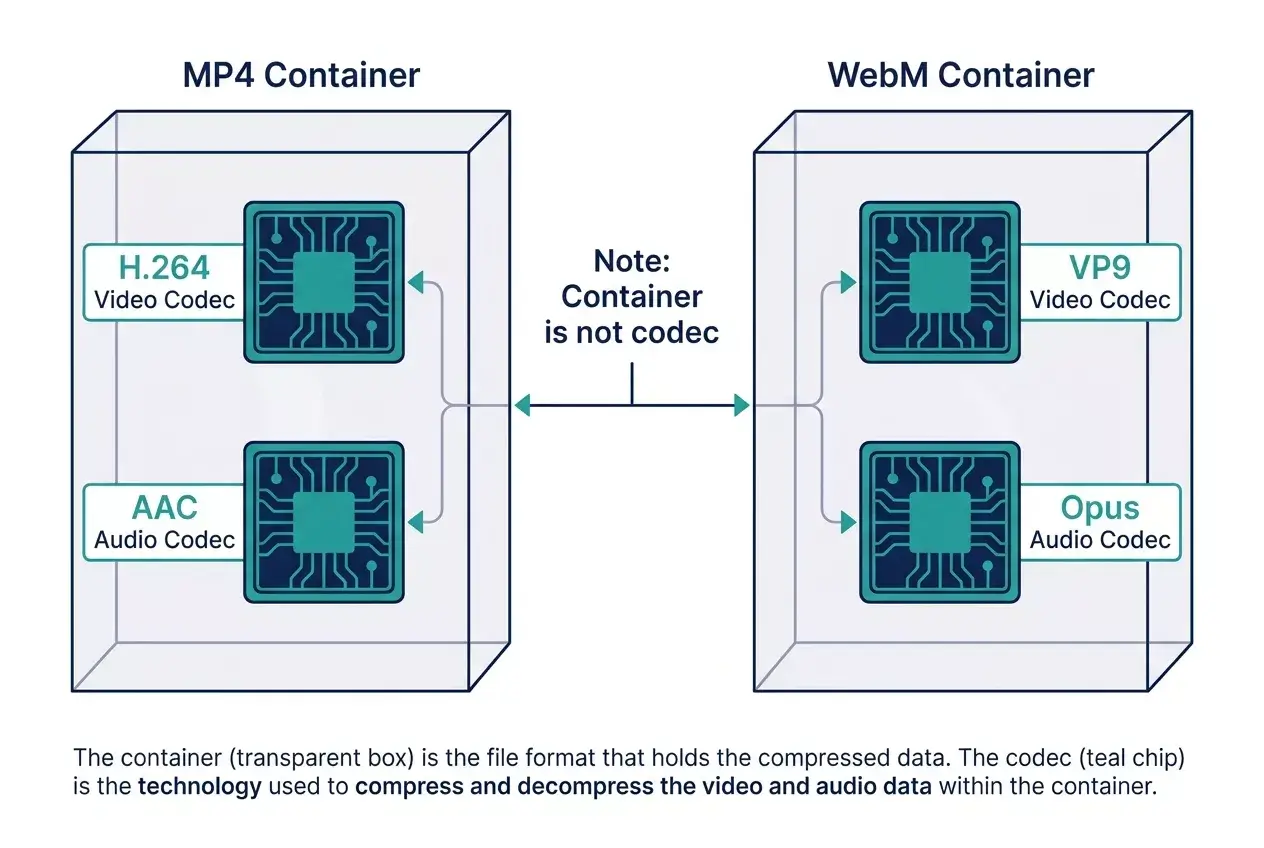
MP4 and WebM are containers. Think of a container as the structure that holds video, audio, timing, and metadata. The filename does not fully identify the codecs inside it.
MDN lists MP4 and WebM among the most common web media containers and notes that MP4 is broadly supported, while WebM was designed for modern web use around open technologies. See MDN’s media container format guide.
MP4 vs WebM at a glance
Consideration | MP4 | WebM |
|---|---|---|
Typical strength | Broad compatibility | Open web-focused format and efficient modern codecs |
Common video codecs | H.264/AVC, H.265/HEVC, AV1, and others | VP8, VP9, AV1 |
Common audio codecs | AAC and others | Opus, Vorbis |
Older device support | Generally stronger | More variable on older software |
Modern browser playback | Broad | Broad in current browsers, with platform variation |
Editing-tool compatibility | Often easier | Depends more on editor and codec support |
Guaranteed smaller file? | No | No |
Guaranteed better quality? | No | No |
Why MP4 is usually the compatibility choice
MP4 is widely recognized across phones, computers, televisions, media players, presentation tools, and editing applications. A common combination is MP4 containing H.264 video and AAC audio. MDN describes that combination as broadly supported across major browsers in its web video codec guide.
Choose an available MP4 option when you plan to:
Move the file between different devices.
Play it in common desktop or mobile applications.
Insert it into a presentation.
Import it into an editor that has limited WebM support.
Use the file across devices whose playback environments differ.
MP4 does not automatically mean H.264, and .mp4 alone does not tell you whether the file contains audio. MDN explains why the MIME type or container name can be too vague without codec information in its codec parameter guide.
Why WebM can be the better web-native choice
WebM was designed for modern web media. It commonly contains VP8, VP9, or AV1 video with Vorbis or Opus audio. It can provide efficient compression, but the result depends on the specific codec and encoding settings.
Choose an available WebM option when:
Your browser and player support the contained codecs.
You are keeping the file in a web-oriented workflow.
The WebM option offers a useful quality-to-size balance.
You do not need compatibility with an older editor or device.
Do not select WebM only because someone says it is always smaller. Compare the actual resolution, bitrate, duration, audio, codec, and file size shown for the specific media.
Container, codec, resolution, and bitrate are different
Four terms are commonly mixed together:
Container: MP4 or WebM, the file structure.
Codec: H.264, VP9, AV1, Opus, or AAC, the method used to encode media.
Resolution: 720p, 1080p, or 4K, the frame dimensions.
Bitrate: The amount of encoded data used over time.
A 1080p WebM file can be smaller or larger than a 1080p MP4 file. A lower bitrate may reduce size but can also reduce quality. More efficient codecs can preserve comparable visual quality with less data, but playback and editing support may vary.
Which format is better for downloaded video?
Use this decision order:
Check authorization and availability. Only use an option you are permitted to save.
Check whether audio is included. Some resources contain video only.
Check device compatibility. Choose MP4 when uncertain.
Check the actual quality and size. Do not infer them from the extension.
Check your next application. Editing software can be more restrictive than a browser.
Quetta displays compatible options detected from the source; it does not guarantee that every source provides both MP4 and WebM. Learn how its supported file detection works on the Video Downloader feature page.
If you need device-specific steps, use the corresponding Solution for Windows, Mac, or Android.
Why a downloaded video can have no sound
Some platforms deliver video and audio as separate streams. A detected MP4 or WebM video option may not contain an audio track. The file extension alone cannot confirm that both tracks are present.
If a file has no sound:
Return to the detected choices.
Look for an option labeled with both video and audio.
Check for a separate supported audio stream.
Try another available format or resolution.
Use a player that supports the contained codecs.
See the consolidated YouTube download troubleshooting guide for a complete diagnosis.
Final recommendation
MP4 is the safer default for compatibility. WebM is a strong option for modern browser playback and open web codecs. The technically correct choice depends on what is inside the container and where you will play or edit it.
Instead of asking “Is MP4 or WebM better?” ask:
Which available file contains the audio, quality, codec, and compatibility I need at a reasonable size?
Frequently asked questions
Is WebM always smaller than MP4?
No. File size depends on codec efficiency, bitrate, resolution, frame rate, duration, audio, and encoding settings—not the container name alone.
Is MP4 always higher quality?
No. Both containers can hold media at different quality levels. Compare the actual source options.
Can I rename WebM to MP4?
Renaming the extension does not convert the container or codecs. Use a legitimate conversion workflow if conversion is necessary and permitted.
Why does the same resolution have different file sizes?
Resolution describes frame dimensions, not the amount of encoded data. Codec, bitrate, frame rate, audio, and video complexity all influence size.