Quetta vs Kiwi Browser: Which Android Browser Fits You?
Compare Quetta and Kiwi Browser for Android extensions, ad blocking, privacy, video tools, updates, and migration considerations before choosing a browser.
Quetta and Kiwi Browser both appeal to Android users who want more control than standard mobile browsers provide. Quetta is actively positioned around extensions, ad blocking, privacy controls, and video tools, while Kiwi is known for bringing desktop-style Chrome extensions to Android. The right choice depends on extension compatibility, maintenance, and the features you use most.
Quick Verdict
Choose Quetta if you used Kiwi Browser for Android extensions but now want a maintained browser with built-in ad blocking, media tools, private storage, and stronger day-to-day privacy controls.
Kiwi Browser was important because it brought desktop-style extension workflows to Android. The problem is not that Kiwi was a bad browser. The problem is that browser safety depends on active maintenance, and Kiwi’s own GitHub repository says the browser is archived and will no longer be maintained after January 2025.
Quetta vs Kiwi Browser At a Glance
Feature | Quetta | Kiwi Browser |
|---|---|---|
Android browser focus | Modern mobile browser with privacy, media, ad blocking, and utility tools | Chromium-based Android browser known for extension support |
Mobile extension support | Yes | Yes, historically, its main draw |
Maintenance status | Active product; verify the latest app release before publishing | GitHub repository says archived/no longer maintained after January 2025 |
Google Play availability | Verify the target market before publishing | Google Play URL returned 404 in the checked market on 2026-07-08 |
Built-in full-format ad blocking | Yes | Mostly extension-dependent workflows |
Preset ad filter lists | Yes | Usually handled through extensions |
Custom ad filter lists | Yes | Usually handled through extensions |
Disallow Acceptable Ads | Yes | Extension-dependent |
Enhanced video downloader | Yes | Not a core Kiwi feature |
Offline video playlist | Yes | No |
Background audio playback | Yes | No |
Private video storage | Yes | No |
Global and site-level script control | Yes | Extension-dependent |
GPC privacy rights | Yes | Not core Kiwi positioning |
Why Kiwi Browser Users Compare Quetta
Kiwi Browser users usually care about control. They are not just looking for another default browser. They often want mobile extensions, stronger ad blocking, privacy tools, dark mode, userscripts, or a more flexible Android browsing setup than Chrome provides.
That is why Quetta is a relevant comparison. Quetta is not positioned as a generic browser replacement. It is a mobile browser built around practical control: extension support, ad blocking, video tools, private storage, script controls, and privacy settings that users can actually see and adjust.

Kiwi Browser Status in 2026
Kiwi Browser should be evaluated differently in 2026 than it was a few years ago. The browser’s src.next GitHub repository says Kiwi Browser is archived and will no longer be maintained after January 2025. In our 2026-07-08 check, the Google Play URL for com.kiwibrowser.browser returned a 404 page in the checked market.
This does not erase Kiwi’s legacy. Kiwi helped prove that Android users wanted desktop-style extension workflows on mobile. But it does mean Kiwi is no longer a safe default recommendation for everyday browsing unless a user understands the maintenance tradeoff.
Extension Support Compared
Kiwi Browser became famous because it supported Chrome-style extensions on Android. For many users, that meant ad blockers, password managers, dark mode extensions, privacy tools, and scripts that Chrome on Android did not allow.
Quetta should be compared against Kiwi from that same user need: can the browser replace the work that extensions did?
Quetta can cover many common Kiwi extension use cases directly:
Ad blocking
Tracker prevention
Dark theme for web content
Private media storage
Site-level script control
Reader mode
Translation workflows
If a user needs one specific legacy extension, they should test it directly before switching. If the extension was only solving a common browsing problem, Quetta may replace that workflow with built-in tools.
Ad Blocking Compared
Quetta is stronger than Kiwi for users who want ad blocking built into the browser rather than assembled through extension setup.
Kiwi users often installed ad-blocking extensions because Kiwi allowed extension workflows. That was useful, but it also depended on the browser remaining compatible, updated, and actively maintained. Quetta’s ad blocking is positioned as a native browser feature with full-format ad blocking, preset filter lists, custom filter lists, and the ability to disallow Acceptable Ads.
This is the clearest comparison for users searching for frustration: they do not just want an extension-capable browser; they want cleaner pages with fewer ads and fewer setup steps.
Video and Media Tools Compared
Kiwi Browser was not primarily a media browser. Quetta has a much stronger media angle.
Quetta includes:
Enhanced video downloader
Video playlist for offline watching
Picture-in-picture support
Sleep timer
Background audio playback
Download videos to private storage
This makes Quetta a better fit for users who want their mobile browser to manage video, offline viewing, and private media storage without relying on several separate extensions.
Privacy and Safety Compared
The biggest difference between Quetta and Kiwi Browser is not a single feature. It is the maintenance and safety model.
A browser handles passwords, cookies, sessions, payment pages, private tabs, downloads, and sensitive browsing data. If a browser is no longer maintained, users should be careful about using it as their daily browser, even if the feature set still looks attractive.
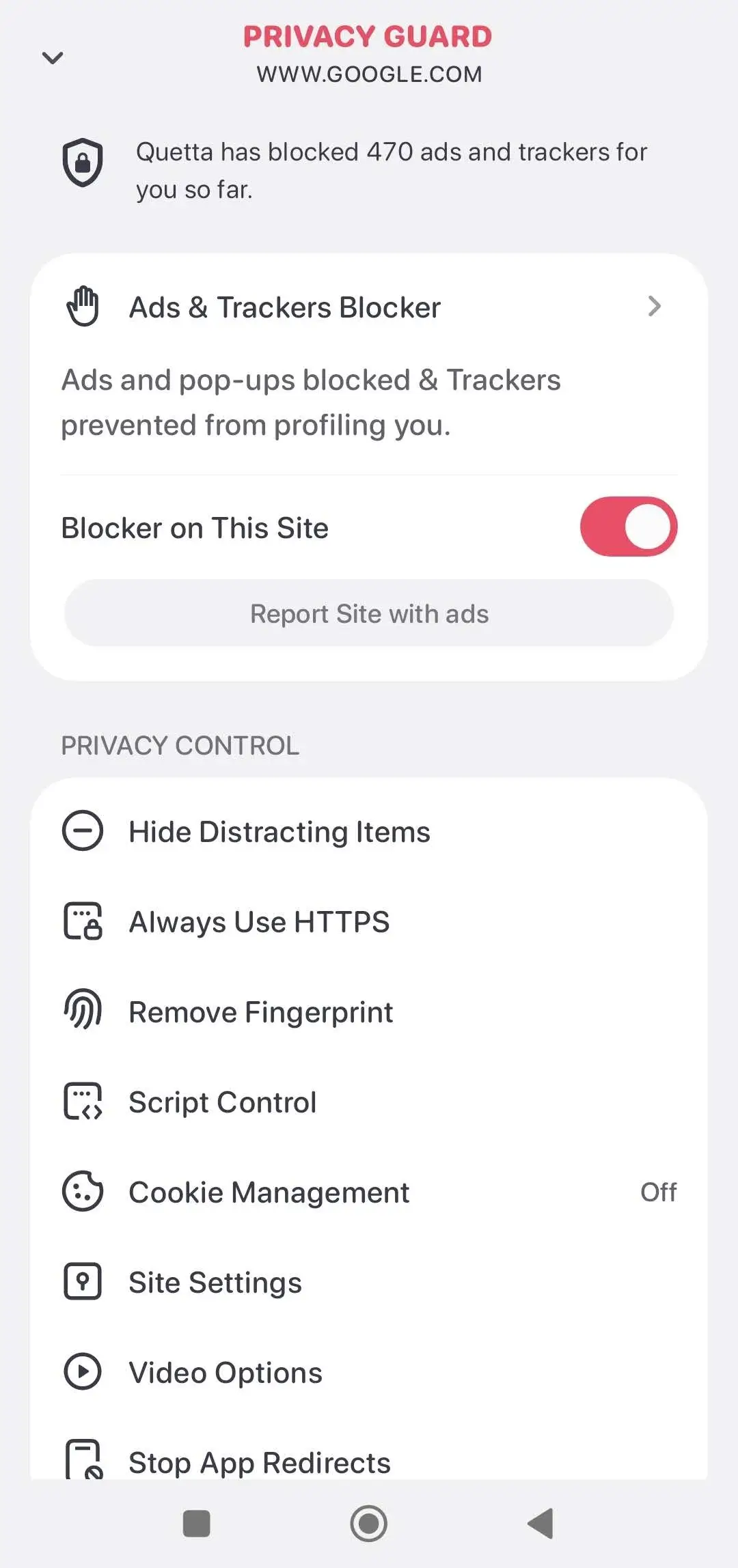
Quetta’s privacy story focused on visible controls:
Prevent cross-site trackers
Remove tracking fingerprints
Stop third-party cookie tracking
Global and site-level script control
Exercise GPC privacy rights
Data Vault with biometric lock
Before publishing, support these claims with current product screenshots or public documentation.
Should Kiwi Browser Users Switch to Quetta?
Switch to Quetta if you want the spirit of Kiwi’s control-focused browsing in a more modern mobile browser. Quetta is especially relevant if your Kiwi setup was built around ad blocking, privacy, video tools, dark mode, or other utilities that Quetta now handles directly.
Keep Kiwi only as a temporary legacy workflow if you already have it installed and need a specific extension while you test replacements. It should not be your long-term default browser without understanding the risk of using an archived browser.
Consider Firefox for Android if your main priority is Mozilla add-ons. Mozilla says Firefox for Android supports add-ons from AMO and the in-browser Add-ons Manager, although some add-ons may not be compatible with Firefox for Android.
Related: Chrome Android extension limitations
How to Move from Kiwi Browser to Quetta
Ready to move from Kiwi Browser? Audit your essential extensions and confirm that your bookmarks, passwords, and daily websites work before changing your default browser.
Follow the complete Kiwi Browser migration checklist
When to Read the Kiwi Alternatives Guide Instead
This page compares Quetta and Kiwi Browser directly. If you want a broader list of browsers to consider, read the main Kiwi alternatives guide.
FAQ
Is Kiwi Browser still safe to use?
Kiwi Browser should be used with caution in 2026. Its GitHub repository says the browser is archived and will no longer be maintained after January 2025. Because browser security depends on ongoing updates, Kiwi is not a strong long-term daily browser recommendation.
Was Kiwi Browser removed from Google Play?
In our 2026-07-08 check, the Google Play URL for com.kiwibrowser.browser returned 404 in the checked market. Play Store availability can vary by country, so recheck your target market before publishing.
Does Kiwi Browser support extensions on Android?
Yes, Kiwi Browser was known for supporting Chrome-style extensions on Android. That was its biggest advantage over Chrome Android, which does not support native in-browser extension use on mobile.
Does Quetta support Android extensions?
Quetta is positioned with mobile extension support, but the publication should include a current product screenshot or help page showing how extension support works. For SEO trust, avoid relying only on a claim in the comparison table.
Is Quetta better than Kiwi Browser?
Quetta is better for users who want a maintained Android browser with built-in ad blocking, media tools, privacy controls, and extension support. Kiwi Browser is mainly relevant for users preserving an older extension workflow.
Is this page a Kiwi Browser alternatives list?
No. This page is a direct Quetta vs Kiwi Browser comparison. For a broader ranked list of browsers, use the main Kiwi Browser alternatives guide.