Quetta vs Chrome: A Chromium-Based Browser With Ad Blocking and Mobile Tools
Compare Quetta vs Chrome for Android extensions, ad blocking, privacy controls, video tools, and everyday browsing to decide which browser fits your needs.

Quetta is a Chromium-based alternative to Chrome for Android users who want a familiar browsing experience with stronger built-in ad blocking, mobile extension support, video tools, and privacy controls. Chrome has strong Safe Browsing protections, but it is not a full ad-blocking browser, and malicious ads remain a real web safety risk.
Quick Verdict
Choose Quetta if you like Chrome’s familiar Chromium browsing experience but want stronger built-in protection against ads, trackers, risky ad redirects, and cluttered mobile pages.
Stay with Chrome if you want the pure Google browser experience above everything else. But if your main concern is “I want Chrome-like browsing with fewer ads and more mobile controls,” Quetta is the more useful comparison.
Quetta does not need to be framed as abandoning Chrome entirely. Because Quetta is based on Chromium, Chrome users can keep much of the web compatibility and familiar browsing behavior they already know, while gaining Quetta-specific features like built-in full-format ad blocking, custom filters, video tools, and privacy controls.
Related internal links: Quetta vs Kiwi Browser
Quetta vs Chrome At a Glance
Feature | Quetta | Chrome Android |
|---|---|---|
Browser base | Chromium-based | Chromium / Google Chrome |
Familiar Chrome-like compatibility | Yes | Yes |
Google Password Manager workflows | Compatible with Google account/password workflows where supported | Native Google integration |
Google Translate workflow | Yes, Chrome-like web compatibility plus Quetta translation tools | Native Google Translate integration |
Google Lens workflow | Can still use Google services from the browser | Native Google Lens integration |
Account sync | Google services can still be used; verify exact Quetta sync behavior before publishing | Strong Chrome account sync |
Mobile extension support | Yes | No native in-browser extension support on Android |
Full-format ad blocking | Yes | No |
Disallow Acceptable Ads | Yes | No |
Preset filter lists | Yes | No |
Custom ad filter lists | Yes | No |
Cross-site tracker prevention | Yes | Limited by Chrome settings |
Enhanced video downloader | Yes | No |
Offline video playlist | Yes | No |
Background audio playback | Yes | No |
Global and site-level script control | Yes | No |
GPC privacy rights | Yes | No |
Quetta Is Not a Total Break From Chrome
Many Chrome users hesitate to switch because they rely on Google services. That concern is valid, but it should be stated accurately.
Quetta is Chromium-based, so the switch does not feel like moving to a completely unfamiliar browser engine. Users can still visit Google services, use Google Search, access Google Password Manager workflows where supported, use Google Translate pages or translation tools, open Lens-related flows, and continue using a browser experience that feels close to Chrome on the modern web.
That changes the comparison. The question is not “Should you give up everything you use in Chrome?” The better question is:
Can you keep a Chrome-like browsing experience while gaining stronger ad blocking, media tools, and privacy controls?
For many Android users, that is the reason to compare Quetta with Chrome.
Where Chrome Is Still Strong
Chrome is still one of the most familiar and widely used browsers on Android. It also has real security infrastructure.
Chrome’s strengths include:
Frequent browser updates
Google Safe Browsing protections
Safety Check
Google Password Manager
Google account sync
Google Translate and Lens integration
Familiar desktop-to-mobile continuity
Google’s own Chrome Help says Safe Browsing can warn users about unsafe sites, downloads, and extensions. That is an important protection and should be acknowledged honestly. Chrome is not a weak browser.
Where Chrome Falls Short: Ads Are a Safety Surface
Chrome has Safe Browsing, but Chrome for Android is not a full ad-blocking browser. That distinction matters.
Ads are not only a nuisance. Bad ads can be used for scams, fake download buttons, phishing pages, forced redirects, malware delivery, and impersonation. Google invests heavily in ad safety, but the scale of harmful ads shows the problem is real. AP reported that Google blocked or removed 8.3 billion ads in 2025, up from 5.1 billion in 2024, while suspending nearly 25 million advertiser accounts.
Security coverage from Wired has also described malicious search ads and malvertising as a continuing scam vector, including ads that lead users toward phishing, fake software, infostealers, and other harmful pages.
The takeaway is not “Chrome is unsafe.” The more accurate point is: Chrome has strong browser security, but it does not remove the ad layer by default. Quetta reduces that exposure by blocking more ads before users interact with them.
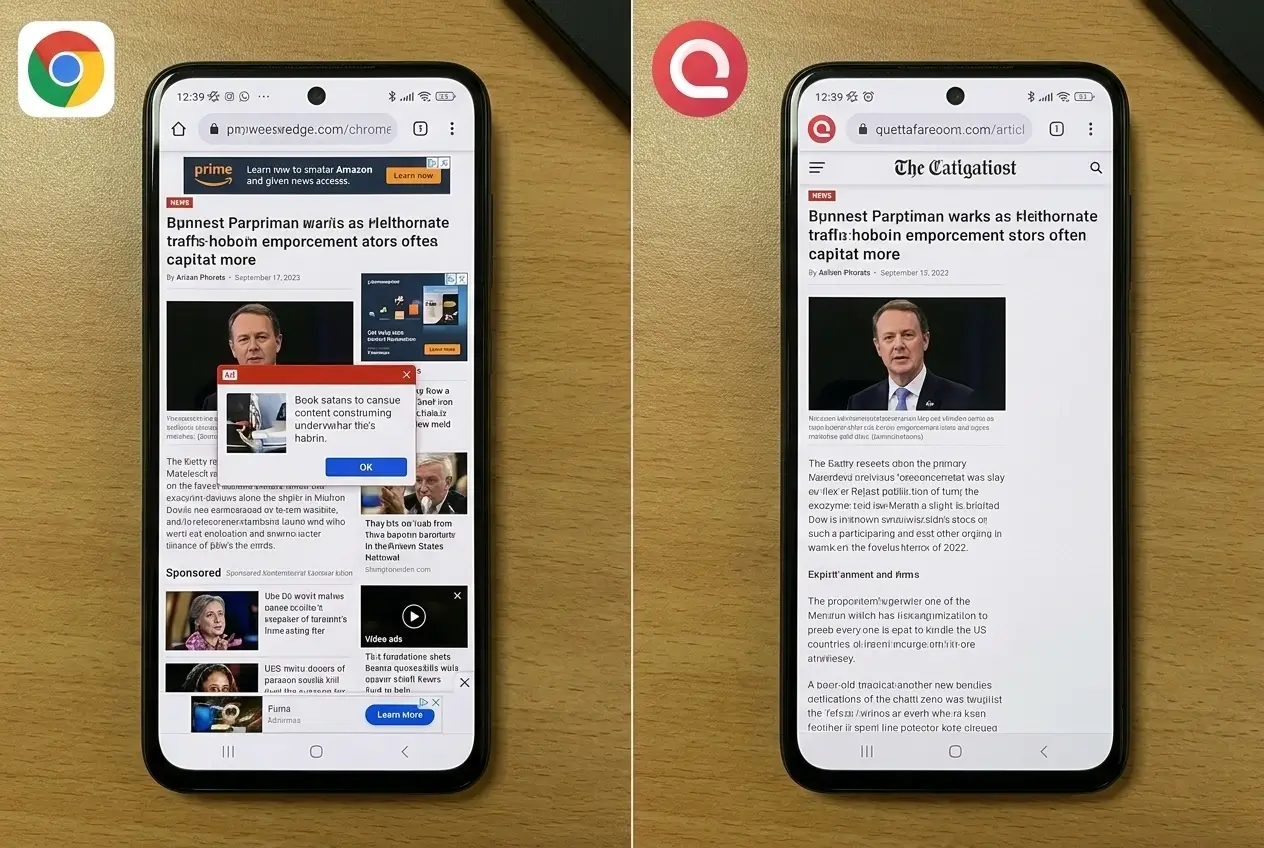
Ad Blocking: Quetta Has the Clearer Advantage
If a user is searching for an Android browser with ad blocking, Quetta has a stronger default position than Chrome.
Quetta includes:
Full-format ad blocking
Preset filter lists
Custom ad filter lists
Ability to disallow Acceptable Ads
Cross-site tracker prevention
Chrome, by contrast, is not designed as a full ad blocker. Users may still see display ads, video ads, sticky ad units, pop-ups, fake download-style ad placements, and aggressive ad layouts depending on the page.
This is the clearest reason to choose Quetta over Chrome: fewer risky ad interactions, fewer distractions, and more control without relying on a separate extension workflow.
Mobile Extensions: Chrome Android Still Has a Gap
Chrome extensions are powerful on desktop, but Chrome Android does not support native in-browser extension use. Google’s Chrome Web Store Help describes extensions as desktop Chrome customizations, and its mobile flow is “Add to Desktop,” meaning the extension is installed for desktop Chrome rather than used inside Chrome Android.
External source: Chrome Web Store Help: Add extensions
That matters for users who want:
Mobile ad-blocking extensions
Script managers
Dark mode tools
Privacy extensions
Custom browser utilities
Extension-based workflows from desktop
Quetta is stronger for users who want a mobile browser designed with extension support and browser-level controls in mind.
What If You Want a VPN Extension on Android?
Quetta supports most VPN extensions from the Chrome Web Store on Android. This is useful if you want to choose a provider and control its browser connection through an extension.
The regular Chrome Android app does not run desktop Chrome extensions locally. If you prefer to keep using Chrome Android, a separate Android VPN app is another route. The choice depends on whether you want an extension workflow or an app-managed connection.
Compare VPN extensions with VPN apps, or follow the Quetta extension setup guide.
Google Password Manager, Translate, Lens, and Account Workflows
The old version of this page made Chrome sound like the only reasonable browser for people who use Google services. That is too broad.
If Google Password Manager is your main password system, if you use Google Translate, if you use Google Lens, or if you use Chrome on desktop, Quetta can still be okay for many of those workflows because it is Chromium-based and can access Google services on the web. The practical question is which workflows require Chrome-native sync and which only require access to Google services.
Use this rule:
If you need Chrome’s exact native sync behavior across desktop and mobile, Chrome may still be easier.
If you mainly need Google services while browsing, Quetta can often preserve the familiar workflow while adding stronger ad blocking and mobile tools.
Before publishing, add screenshots for any exact Google Password Manager, Lens, Translate, or account-sync claim you want to make.
Video and Media Tools
Chrome is a general-purpose browser. Quetta is more useful for users who watch, save, and manage video from the browser.
Quetta includes:
Offline video playlist
Picture-in-picture support
Sleep timer
Background audio playback
Video downloads to private storage
These are not just nice-to-have features. They create a different mobile browsing experience: fewer apps, fewer workarounds, and more control over media consumption.
Privacy and Control
Chrome provides security protections, but Quetta gives users more visible browser-level controls.
Quetta’s privacy and control features include:
Cross-site tracker prevention
Fingerprint tracking protection
Third-party cookie tracking prevention
Global and site-level script control
GPC privacy rights
Biometric Data Vault
This section should be supported with real product screenshots. The strongest trust signal is not saying “Quetta is private”; it is showing users the exact switches and controls they can use.
Who Should Choose Chrome?
Choose Chrome if:
You want the pure Google browser experience.
You need exact Chrome sync across desktop and Android.
You rely heavily on native Chrome account features.
You do not mind ads or using another protection layer outside the browser.
You prefer the most familiar default Android browser.
Chrome remains a strong browser. The point of this comparison is not to deny that. The point is that Chrome is not optimized for users whose biggest problems are ads, mobile extensions, video workflows, and visible privacy controls.
Who Should Choose Quetta?
Choose Quetta if:
You want a Chromium-based browser that still feels familiar.
You want stronger built-in ad blocking than Chrome.
You want to reduce exposure to risky ads, fake download buttons, and intrusive ad layouts.
You want mobile extension support.
You want video downloading, background audio, and private media storage.
You want custom filters, script controls, and GPC privacy rights.
You still use Google services but do not need Chrome’s exact native sync experience.
Switching Checklist
Check which Google workflows you actually use: Password Manager, Translate, Lens, account sync, bookmarks, or desktop tabs.
Confirm which workflows work directly in Quetta.
Turn on Quetta’s built-in ad blocking.
Add preset and custom filter lists if needed.
Test your top 10 daily websites.
Test your login, payment, media, and download workflows.
Set Quetta as your default browser only after the essentials work.
FAQ
Is Quetta based on Chromium?
Yes. Quetta is positioned as a Chromium-based mobile browser. That means Chrome users can keep a familiar browsing experience while adding Quetta-specific features such as built-in ad blocking, mobile extension support, video tools, and privacy controls.
Can I still use Google Password Manager, Google Lens, and Translate in Quetta?
You can still use Google services from Quetta. If your workflow only needs access to Google services, Quetta can often be enough. If you need Chrome’s exact native sync behavior between desktop Chrome and Android Chrome, Chrome may still be simpler.
Is Chrome unsafe because of ads?
Chrome is not an unsafe browser. Chrome has Safe Browsing and frequent security updates. The issue is narrower: Chrome Android is not a full ad-blocking browser, and malicious or deceptive ads can still be a risk on the web. Quetta reduces that exposure by blocking more ads by default.
Does Chrome on Android support extensions?
No. Chrome Android does not support native in-browser extension use. Google’s Chrome Web Store Help describes a mobile “Add to Desktop” flow, which installs extensions for desktop Chrome rather than Chrome Android.
Does Quetta block ads better than Chrome?
Yes, Quetta is better aligned with ad-blocking intent because it includes built-in full-format ad blocking, preset filter lists, custom filter lists, and the ability to disallow Acceptable Ads. Chrome for Android is not built as a full ad blocker.
Should Chrome users switch to Quetta?
Chrome users should consider Quetta if they want a familiar Chromium-based browser with stronger ad blocking, fewer risky ad interactions, mobile extension support, video tools, and privacy controls. Users who need pure Chrome sync may prefer staying with Chrome.