Quetta vs Firefox Android: Extensions, Privacy, and Ad Blocking Compared
Firefox Android supports selected mobile add-ons and strong tracking protection. Compare it with Quetta for mobile extensions, ad blocking, video tools, script control, and privacy workflows.
Firefox Android is one of the best mainstream Android browsers for privacy and partial extension support. Quetta is a stronger fit if you want a browser that combines mobile extension support with built-in ad blocking, custom filter lists, video downloading, private media storage, script control, and GPC privacy rights.
Quick Verdict
Choose Firefox Android if you want Mozilla’s privacy protections, a non-Google browser engine, and supported Android-compatible add-ons.
Choose Quetta if you want privacy plus more built-in mobile utilities, especially ad-blocking controls, video tools, private storage, and script-level controls.
Quetta vs Firefox Android At a Glance
Feature | Quetta | Firefox Android |
|---|---|---|
Mobile extension support | Chrome Web Store and compatible Edge add-ons on Android | Android-compatible extensions from Mozilla’s catalog |
Extension source | Chrome WebStore, Microsoft Edge | AMO Android and Add-ons Manager |
Full-format ad blocking | Yes | Extension-based |
Custom ad filter lists | Yes | Extension-based |
Prevent cross-site trackers | Yes | Yes, Enhanced Tracking Protection |
Total Cookie Protection | Verify Quetta implementation wording | Yes, through Firefox ETP |
Enhanced video downloader | Yes | No |
Offline video playlist | Yes | No |
Background audio playback | Yes | No |
Data Vault with biometrics | Yes | Yes/available through platform privacy features; verify exact wording |
Global and site-level script control | Yes | Extension/configuration dependent |
GPC privacy rights | Yes | Not core Android positioning |
Extension Support: Both Help, But in Different Ways
Firefox Android is one of the rare mainstream Android browsers with real extension support. Mozilla says users can install Firefox for Android add-ons from addons.mozilla.org/android or from the in-browser Add-ons Manager.
The main difference is the extension ecosystem. Firefox installs Android-compatible Mozilla add-ons, while Quetta provides access to Chrome Web Store and compatible Edge extensions. Choose according to the extension you want and the features its Android workflow provides.
Quetta should be positioned differently: it is not only about extensions. It covers many common extension use cases directly inside the browser, including ad blocking, dark web content, media tools, privacy controls, and script-level settings.
VPN Extensions: Choose the Ecosystem You Need
Quetta supports most Chrome Web Store VPN extensions on Android. Firefox offers its own Android-compatible add-ons; for example, AdGuard documents VPN extension support for Firefox Android.
These are different installation routes, not evidence that one browser protects every type of traffic. Read our Android VPN extension guide to choose a route, and compare extensions with VPN apps if you need coverage beyond browsing.
Privacy: Firefox Has Strong Default Protections
Firefox Android has a strong privacy story. Mozilla says Enhanced Tracking Protection is enabled by default and uses a list from Disconnect to identify known trackers. Firefox also supports protection levels such as Standard, Strict, and Custom.
Firefox also includes Total Cookie Protection in Firefox 111 and above, isolating tracking cookies to the site that created them.
Related: Quetta privacy features
Where Quetta Can Win
Quetta can win when the user’s browser needs go beyond standard privacy protection:
No Acceptable Ads
Preset and custom filter lists
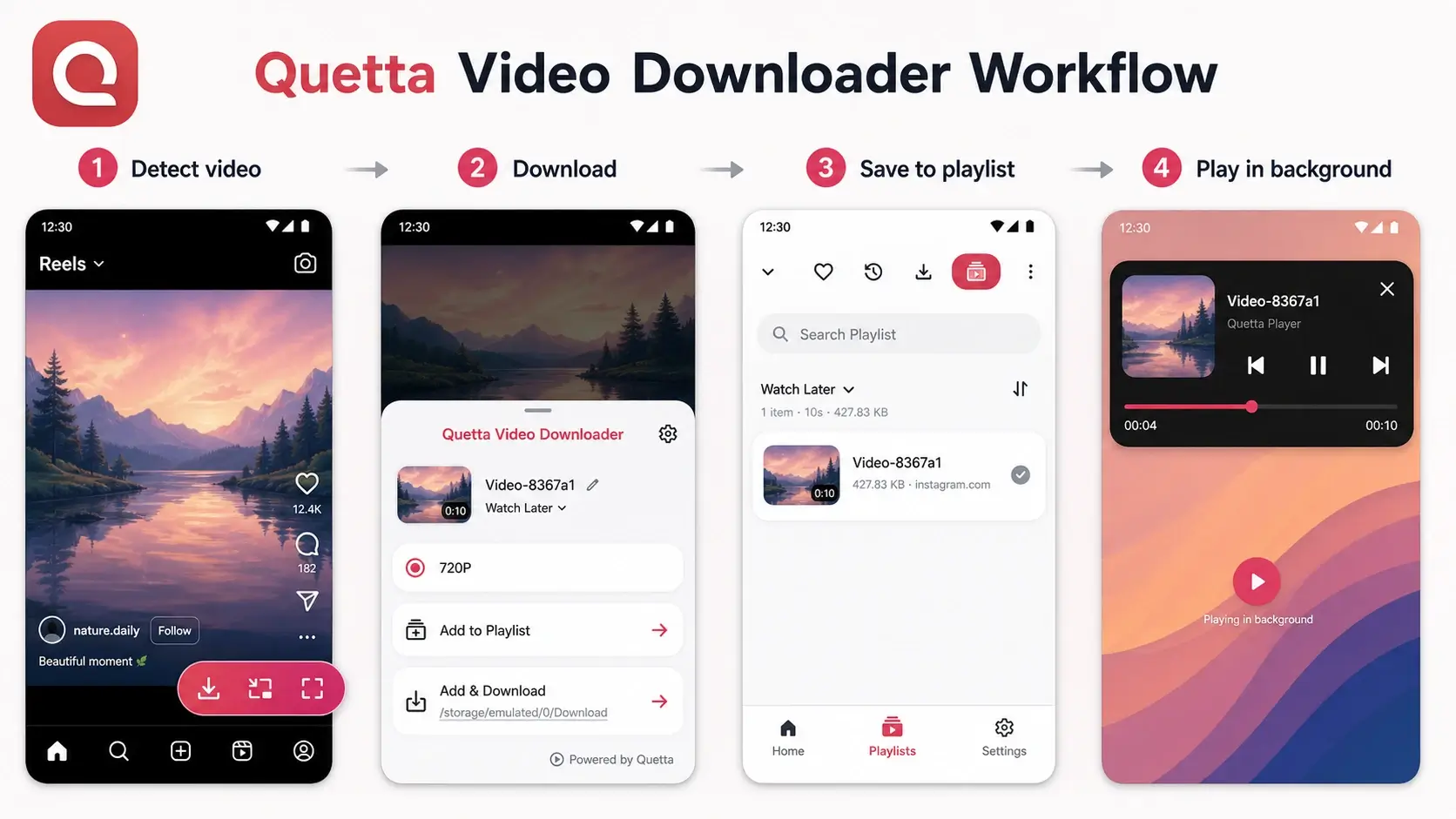
Enhanced video downloader
Offline video playlist
Private video storage
Background audio playback
Sleep timer
Side-by-side translator
Global and site-level script control
GPC privacy rights
Ad Blocking: Built-In Controls vs Add-On Setup
Firefox Android can block ads through supported add-ons. That is powerful, especially for users who want familiar tools.
Quetta’s advantage is setup simplicity and product-level control. Users can turn on ad blocking, use preset lists, add custom filters, and disallow Acceptable Ads without building the whole workflow around add-ons.
Media Features
Firefox Android is not primarily a media-management browser. Quetta is.
Quetta gives this page a unique angle because it can answer queries that Firefox pages usually do not target:
Browser with background audio
Browser with private video storage
Browser with sleep timer
Offline video playlist browser
Who Should Choose Firefox Android?
Choose Firefox Android if:
You trust Mozilla’s privacy approach.
You want a non-Google browser engine on Android.
Your must-have add-ons are available for Firefox Android.
You prefer a mainstream browser with a long privacy reputation.
You use Firefox on desktop and want sync.
Who Should Choose Quetta?
Choose Quetta if:
You want privacy controls plus built-in mobile utilities.
You want ad blocking without depending only on add-ons.
You want video downloads, background audio, and private media storage.
You want global and site-level script control.
You want a practical Kiwi Browser alternative with broader mobile features.
Related: Quetta vs Kiwi Browser
FAQ
Does Firefox Android support extensions?
Yes. Firefox Android supports Android-compatible extensions from Mozilla’s add-on catalog and the browser’s extension manager. It uses a different ecosystem from the Chrome Web Store, so look for the provider’s Firefox version and its Android support information.
Is Firefox Android better than Chrome for extensions?
Yes, for mobile extension support. Chrome Android does not support native in-browser extensions, while Firefox Android supports Android-compatible add-ons.
Is Firefox Android more private than Quetta?
Firefox Android has strong documented privacy protections, including Enhanced Tracking Protection and Total Cookie Protection. Quetta can compete by offering visible privacy controls, script control, GPC rights, and Data Vault features.
Does Firefox Android block ads by default?
Firefox Android blocks many trackers by default, but full ad blocking usually depends on supported add-ons. Quetta is positioned around built-in full-format ad-blocking and filter controls.