Ad Blocking Browser for Android: A Cleaner Way to Browse
Block intrusive ads, pop-ups, redirects, and trackers with Quetta’s built-in ad blocker for Android. Browse with fewer distractions and more control.
An ad-blocking browser stops many advertising and tracking requests before they clutter a page. Quetta includes ad blocking directly in the browser, helping Android users reduce intrusive ads, pop-ups, redirects, and tracking scripts without installing a separate ad-block extension.
What is an ad-blocking browser?
The simplest way to block ads while browsing on Android is to use a browser with a built-in ad blocker. Because the blocking is integrated into the browser, it can work automatically across supported websites and can be managed from one place.
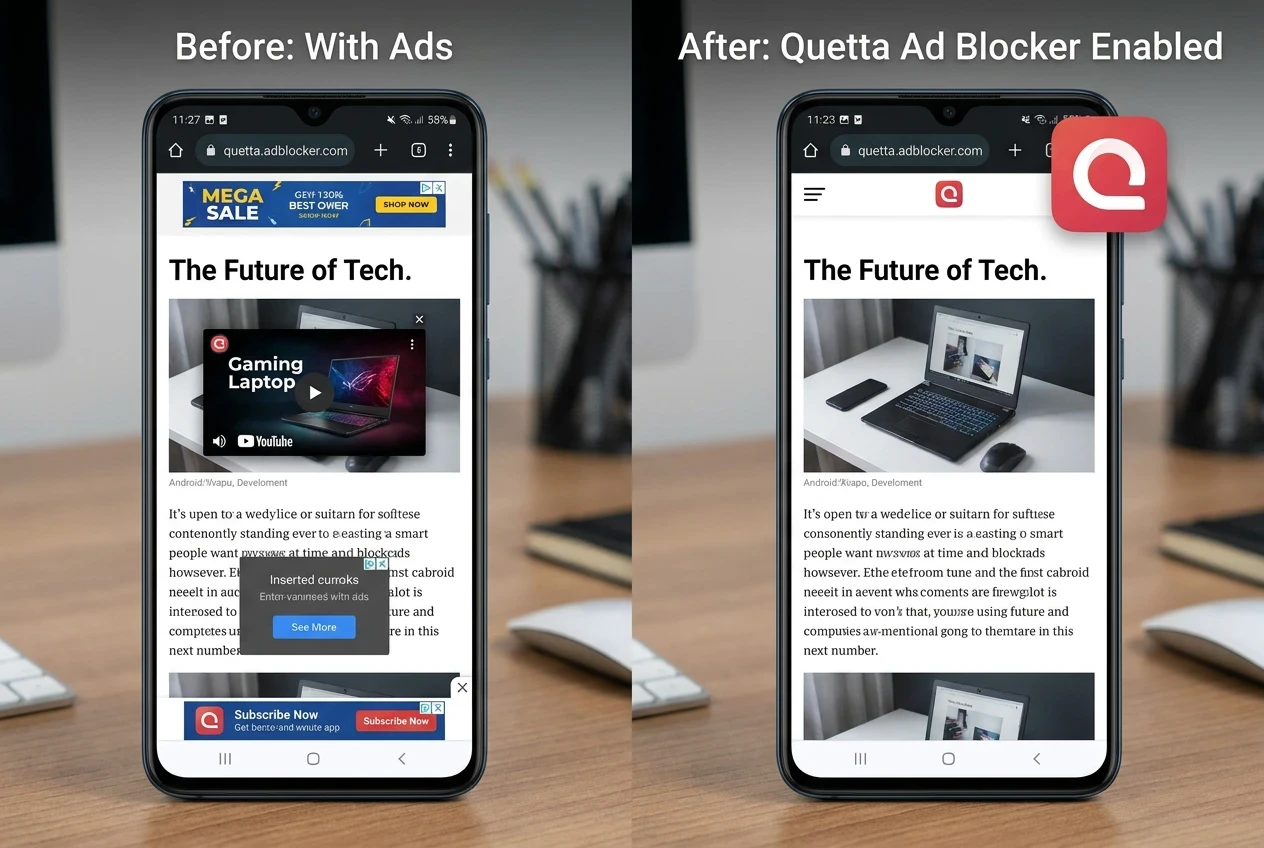
Why mobile ads can make browsing frustrating
Not every ad is harmful, but intrusive advertising can get in the way of the task a user is trying to complete. Full-screen overlays hide content. Pop-ups interrupt navigation. Fake download buttons create confusion. Auto-playing media can consume data, while advertising and analytics scripts add more requests for the browser to process.
The problem is especially noticeable on a phone, where screen space, battery life, and mobile data are limited. A useful ad-blocking solution should therefore do more than hide empty ad boxes. It should reduce disruptive requests while still giving the user control when a site needs an exception.
How does an ad-blocking browser work?
An ad-blocking browser checks network requests and page elements against blocking rules. When a request matches a known advertising, tracking, pop-up, or malicious pattern, the browser can prevent it from loading or remove the related page element.
Quetta uses a built-in ad-blocking engine, so the core protection does not depend on adding a separate ad-block extension. Quetta states that its content analysis and blocking rules run locally on the device, rather than requiring a user's personal browsing history to be uploaded for processing.
This integrated approach can provide three practical benefits:
Less setup: Protection is available from the browser instead of a separate app or extension.
Consistent controls: Users can manage blocking behavior and site exceptions in one place.
A cleaner page: Blocking a request before it loads can remove an interruption instead of merely covering it afterward.
What Quetta can block while you browse
Quetta's ad-blocking tools are designed to address several common sources of interruption:
Display ads and page overlays
Pop-ups and unwanted redirects
Many advertising and analytics trackers
Deceptive page elements, including some fake download buttons
Video advertising on supported websites
No ad blocker can promise perfect results on every website forever. Websites change their delivery methods, and some content may be served from the same source as the page itself. A trustworthy solution should make this limitation clear and provide filter updates, site controls, and troubleshooting options.
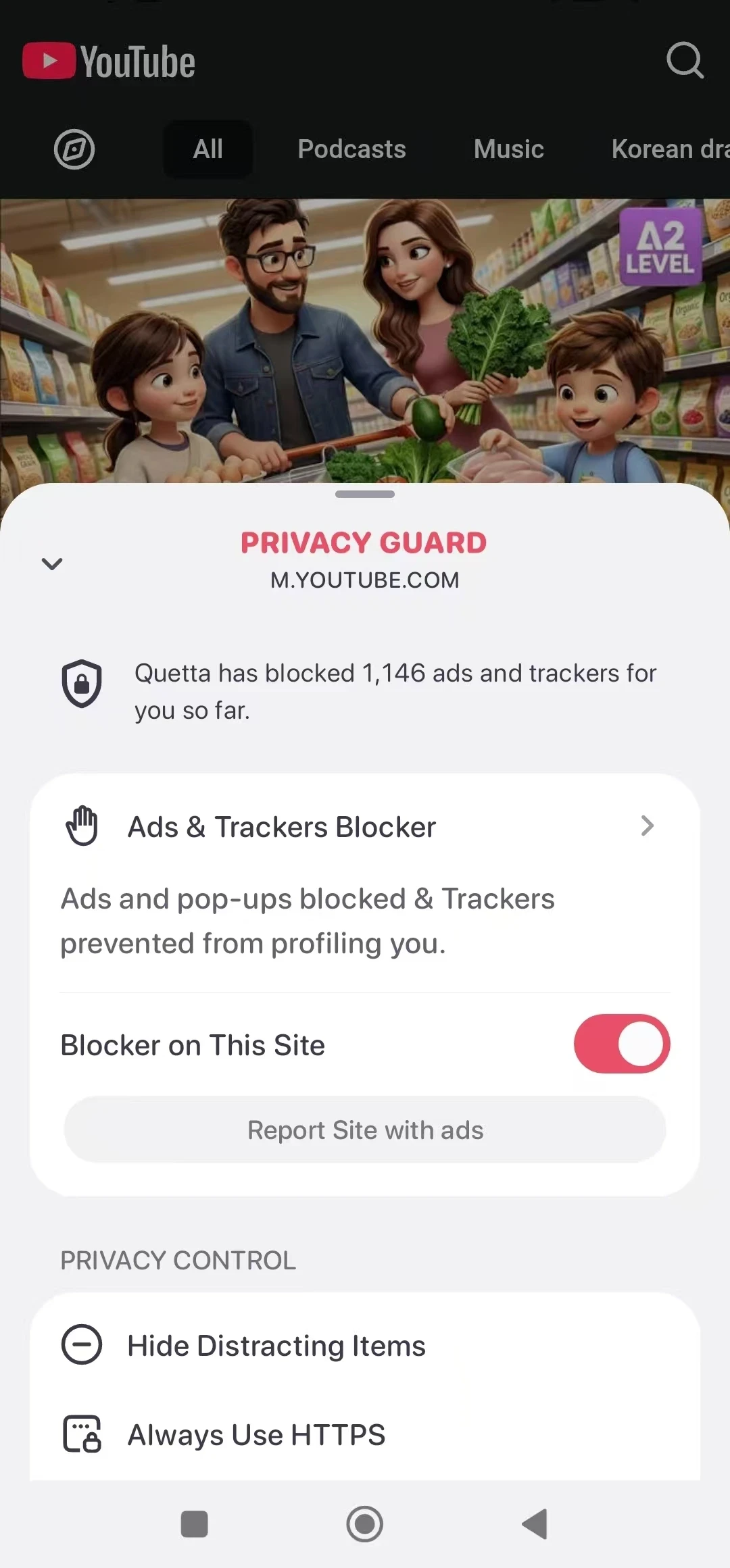
How to block ads on Android with Quetta
The exact labels may vary by app version, but the normal flow is straightforward:
Download Quetta Browser on your Android device.
Open Quetta and go to the browser settings.
Open Ad Blocker and turn protection on.
Visit a website and confirm that the page works as expected.
If a trusted site does not load correctly, pause blocking for that site or create an exception.
Users who want more control can also review Quetta's guide to managing ad-block filters. Filter choices should match the user's goals: more aggressive lists may remove more page elements, but they can also increase the chance that a site breaks.
Built-in ad blocking vs. an ad-block extension
Both approaches can be useful, but they solve the problem differently.
Consideration | Built-in browser ad blocker | Ad-block extension |
|---|---|---|
Setup | Included with the browser | Installed separately |
Mobile availability | Designed for the browser's mobile interface | Depends on whether the mobile browser supports extensions |
Updates | Managed with the browser or its filter system | Managed by the extension developer |
Site controls | Usually integrated into browser settings | Usually handled inside the extension |
Customization | Varies by browser | Can be extensive in advanced extensions |
For most mobile users, a built-in blocker is the simpler starting point. Power users may prefer more granular filter controls or combine browser protections with carefully chosen extensions. The best option is the one that blocks unwanted content without hiding controls or making it difficult to allow a trusted site.
Ad blocking and privacy are related, but not identical
Blocking ads can reduce contact with many advertising trackers, but it does not make a user anonymous. Websites may still receive an IP address, account activity, cookies, or other signals required to deliver a page.
For broader protection, combine ad blocking with tracker prevention, cookie controls, fingerprinting defenses, and secure connections. Quetta groups these controls in Privacy Guard, giving users a clearer way to manage more than advertising alone.
How to choose a good ad-blocking browser
Before choosing a browser, check whether it offers:
Blocking that works without a complicated setup
Clear controls for individual websites
Regular rule or filter updates
Tracker and redirect protection
Transparent privacy practices
A way to report broken pages
Good performance on the device you use
Be cautious with products that promise to block every ad, guarantee anonymity, or require unnecessary access to browsing data. Clear limitations are a stronger trust signal than an impossible promise.
Frequently asked questions
Can I block ads on Android without installing an extension?
Yes. A browser with a built-in ad blocker can block many intrusive ads and trackers without a separate extension. Quetta includes this capability in the browser.
Does an ad blocker block every ad on every website?
No. Results vary because websites and advertising systems change. Some ads may share infrastructure with the site's main content, and aggressive blocking can occasionally break a page.
Can I allow ads on a website I trust?
Yes. A good ad-blocking browser should let you pause protection or allow a specific site. This is useful when you want to support a publisher or troubleshoot a page.
Does blocking ads save mobile data?
It can reduce the data used by blocked advertising, media, and tracking requests. The actual difference depends on the website and the content it loads.
Is ad blocking the same as private browsing?
No. Ad blocking reduces certain ads and trackers. Private browsing mainly limits what is stored in that local browsing session. Neither guarantees anonymity.
Browse with fewer interruptions
Quetta brings ad blocking, privacy controls, video tools, and Android extension support into one browser. Explore the full Quetta Ad Blocker feature set, or download Quetta to try a cleaner mobile browsing setup.